Minggu, 19 Juni 2011
The list of applications for mobile phones that contains a trojan virus
3D_miniGolf[1].1.01krack.sis
6630-SnapShot2[1].03.sis
6630-VideoEditor210.sis
Anti Virus.sis
Auto Pilot3[1].01full.sis
Big-2 by__dotSiS.sis
BitStorm_full1[1].0-XiMpda.sis
Blocks_Fullkrack.sis
bluster III Full.sis
BounceMP3_[1]NEW.sis
BugMe1[1].23_Full_Dotsis.sis
callcheater3[1].01-XiMpda.sis
Chinese Star1[1].01krack.sis
ControlFreak2[1].0_Full.sis
CosmicFighter3[1].0.sis
CosmicFighter_krack.sis
Digital Red Bowling.sis
DVD-to-NOKIA-6670.sis
DVDPlayer2[1].01_Fullkrack.sis
FaceWave5[1].0_dotSiS.sis
FlashLite[1].v1.1fullkrack.sis
FreeCall_1[1].01-XiMpda.sis
Fscaller5[1].01_Full_dotSiS.sis
Funny Drawer2[1].00_Full.sis
gina-v1[1].1fullkrack.sis
HeliAttac101_Full_dotSiS.sis
ImagePlus2[1].15_Full.sis
Mahjong2[1].34.sis
Mahjong301_Full_QmzXiz.sis
matefinder_1[1].01-XiMpda.sis
MessageStorer_krack.sis
Mobiola Webcam.sis
MotoRacer_Full.sis
Mumsms4[1].01_XimPDA.sis
pocketdictionary_V1.sis
PowerGprs_3[1].01-dotSis.sis
Quicksheet_kracked_S60.sis
RubiksCube1[1].19krack.sis
Smart Movie.sis
SmartLauncher2[1].06s70.sis
SmartLauncher2[2].06s70.sis
Snowboard_Fullkrack.sis
Sony_Camcoder Pro_S60.sis
SplashID_4[1].13_S60.sis
Super Anti Virus 1[1].0 .sis
SuperMario3_Fullkrack.sis
SuperMovie1[1].0_dotSiS.sis
SuperMP31[1].0_dotSiS.sis
supperNes_1[1].0_Beta_dotSiS.sis
Ultra Mp3.sis
vBoy[1].v2.0.S60.oWnPDA.sis
VNes[1].v2.0-XiMpda.sis
XCaller_Fullkrack.sis
Yellow_YFtpC_2[1].33_SymTEE.sis
ZipMan_full2[1].0-XiMpda.sis
Be careful with these files, because it will damage your mobile phone
How to Reset Cache BlackBerry App World Through Shortcut
Many users of BlackBerry devices that use a cache reset method BlackBerry App World by using the ALT + RST. But now there is a shortcut command that can be used to do that in order to reset the cache becomes more simple and easy.
We simply open the keyboard by swiping from the bottom left panel and type the letter "rst". Up to this writing I have not been able to confirm whether this method will actually clean the cache as the same steps with the key combination ALT + RST, so for those who have Playbook please try.
New Cook Book Application for iPad
It must be admitted that the iPad 2 and a tablet is a very versatile device, which allows the user to do anything with a technology in their grasp, from playing games, watching movies, reading books, to control the DVR. In addition to regular home-based activities, some people even take tablets to help them in the kitchen. It would be fun if you can access all your favorite recipes while in the kitchen, but what happens when your hands are dispensing food, you certainly do not want to dirty your tablets, do not you?
Rutch Reichl offers a solution to solve this problem. An application that allows you to turn the pages without touching the screen. Wow .. How? The first thing that crossed my mind a lot of people probably are about the technology "voice command", but apparently they take it a step further than that. This application detects hand movement by using the front camera iPad 2. This method certainly allows you to turn the pages without having to pollute the screen and make your tablet-flavored fish.
Perhaps you wonder a little, why they do not use technology "voice command" to allow users to flip pages by simply making a sound. The question is quite intelligent. The answer is, because they enable you to sing freely without fear of accidentally turning the page because the lyrics are trigger a voice command. Reichl is currently an application has not been released, and you have to wait to await developments reportedly
Rutch Reichl offers a solution to solve this problem. An application that allows you to turn the pages without touching the screen. Wow .. How? The first thing that crossed my mind a lot of people probably are about the technology "voice command", but apparently they take it a step further than that. This application detects hand movement by using the front camera iPad 2. This method certainly allows you to turn the pages without having to pollute the screen and make your tablet-flavored fish.
Perhaps you wonder a little, why they do not use technology "voice command" to allow users to flip pages by simply making a sound. The question is quite intelligent. The answer is, because they enable you to sing freely without fear of accidentally turning the page because the lyrics are trigger a voice command. Reichl is currently an application has not been released, and you have to wait to await developments reportedly
Sabtu, 18 Juni 2011
practical way of eliminating the camera sound
You do not need to bother to go to the Xplorer, and varying the settings on the phone. Because if any-one could be dangerous also for your mobile phone
How? of course using the application. Live install, you do not need anymore right brain tweaking. Well this time it is used Avis Silent Camera V 1.0, is small and does not burden the system. This autostart application, so the menu is opened all the features of the camera sound be turned off, then when you are not using the camera menu again the sound will automatically return to normal.
Who are interested please download Avis Silent
How? of course using the application. Live install, you do not need anymore right brain tweaking. Well this time it is used Avis Silent Camera V 1.0, is small and does not burden the system. This autostart application, so the menu is opened all the features of the camera sound be turned off, then when you are not using the camera menu again the sound will automatically return to normal.
Who are interested please download Avis Silent
How To Save Battery Android Phone
A number of complaints arising from the users of the Android phone is the battery life is relatively short. As is known, Google's Android complete with a variety of connectivity, which unfortunately requires a high battery consumption. For example, streaming music is the main feature of Android, but that's what causes the batteries run out quickly. If you decide not to do music streaming, then you also would not be able to enjoy this important feature.
Should also know what applications are consuming a lot of batteries. That way you can turn it off when not in use so the battery can be more economical. Some of them:
1. GPS
Use GPS if perlua only. These applications use large amounts of battery power. You can use the Power Control widget to quickly shut down and activate it if needed. To determine the ON / OFF you simply look at the notification bar; a GPS icon will appear if the GPS is active.
2. Bluetooth
Turn off Bluetooth if you do not use it. The quickest way to ON / OFF is to press the Bluetooth widget on the homescreen.
3. WiFi
If the GPS and you should turn off Bluetooth when not in use, then the treatment is slightly different with WiFi. You are allowed to activate the WiFi continuously rather than having to turn on and off periodically. To continue to enable it please go to Settings> Wireless networks> Wi-Fi Settings. Tap the Menu button> Advanced> Wi-Fi sleep policy> Never.
4. Mobile Data
Make sure you turn off the option Always-On the Mobile Data. This menu is active by default, so you have to turn it off yourself. To arrange please go to Settings> Wireless & Networks> Mobile Networks> Enable always-on mobile data. If the active state, then this feature will make the phone you keep connected to the internet. Its function is to obtain a variety of notification, despite the fact that when you turn off that feature, Gmail and GTalk notifications you can still receive. But for other applications that require an Internet connection is definitely Mobile Data must be in active state.
5. Screen Timeout
pilihlah Screen Timeout yang paling tepat. 15 detik barangkali terlalu cepat tapi 1 menit terlalu lama untuk membiarkan screen ponsel menyala. Pilihlah 30 detik. Cara mengaturnya ada di Settings > Screen & display > Screen timeout.
6. Screen Brightness
Screen Brightness on your cell phone does require a special battery power. To make a 30% brightness at the position. Can be set in the Settings> Screen & Display> Brightness.
7. Wallpaper
Wallpaper with 3D animation is a nice view, but remember to move the animation to battery power. We recommend using only satis wallpaper.
8. AMOLED Display
Not all Android phones using the technology of AMOLED displays. But if by chance your Android phone equipped with AMOLED display, then you need to know that the point is to save battery usage. This happens because every pixel on the OLED screen is photoemissive which will have its own source of light. That's why mobile phones with AMOLED Display does not need a backlight and pixel automatically in the OFF state and make it black. As a result, you can save on battery usage.
9. Automatic Updates
Use the appropriate interval for automatic updates. Basically you do not need automatic updates except the emails always want to monitor. You can choose the right time to get automatic updates, you even can set it in the OFF state. If you want to get automatic updates, then set the settings on the longest time interval.
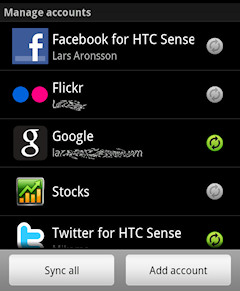
If you use the HTC Android phone equipped Sense, you can get updates for HTC Mail Client, the HTC Weather App, Facebook, Flickr, and Twitter Stocks often as you want. Can be arranged through the Settings> Accounts & sync.
If still in doubt whether you are running applications that require high battery power or not, you can see in the Settings> About phone> Battery> Battery use and tap on an item to find out the details. Good luck;)
Should also know what applications are consuming a lot of batteries. That way you can turn it off when not in use so the battery can be more economical. Some of them:
1. GPS
Use GPS if perlua only. These applications use large amounts of battery power. You can use the Power Control widget to quickly shut down and activate it if needed. To determine the ON / OFF you simply look at the notification bar; a GPS icon will appear if the GPS is active.
2. Bluetooth
Turn off Bluetooth if you do not use it. The quickest way to ON / OFF is to press the Bluetooth widget on the homescreen.
3. WiFi
If the GPS and you should turn off Bluetooth when not in use, then the treatment is slightly different with WiFi. You are allowed to activate the WiFi continuously rather than having to turn on and off periodically. To continue to enable it please go to Settings> Wireless networks> Wi-Fi Settings. Tap the Menu button> Advanced> Wi-Fi sleep policy> Never.
4. Mobile Data
Make sure you turn off the option Always-On the Mobile Data. This menu is active by default, so you have to turn it off yourself. To arrange please go to Settings> Wireless & Networks> Mobile Networks> Enable always-on mobile data. If the active state, then this feature will make the phone you keep connected to the internet. Its function is to obtain a variety of notification, despite the fact that when you turn off that feature, Gmail and GTalk notifications you can still receive. But for other applications that require an Internet connection is definitely Mobile Data must be in active state.
5. Screen Timeout
pilihlah Screen Timeout yang paling tepat. 15 detik barangkali terlalu cepat tapi 1 menit terlalu lama untuk membiarkan screen ponsel menyala. Pilihlah 30 detik. Cara mengaturnya ada di Settings > Screen & display > Screen timeout.
6. Screen Brightness
Screen Brightness on your cell phone does require a special battery power. To make a 30% brightness at the position. Can be set in the Settings> Screen & Display> Brightness.
7. Wallpaper
Wallpaper with 3D animation is a nice view, but remember to move the animation to battery power. We recommend using only satis wallpaper.
8. AMOLED Display
Not all Android phones using the technology of AMOLED displays. But if by chance your Android phone equipped with AMOLED display, then you need to know that the point is to save battery usage. This happens because every pixel on the OLED screen is photoemissive which will have its own source of light. That's why mobile phones with AMOLED Display does not need a backlight and pixel automatically in the OFF state and make it black. As a result, you can save on battery usage.
9. Automatic Updates
Use the appropriate interval for automatic updates. Basically you do not need automatic updates except the emails always want to monitor. You can choose the right time to get automatic updates, you even can set it in the OFF state. If you want to get automatic updates, then set the settings on the longest time interval.
If you use the HTC Android phone equipped Sense, you can get updates for HTC Mail Client, the HTC Weather App, Facebook, Flickr, and Twitter Stocks often as you want. Can be arranged through the Settings> Accounts & sync.
If still in doubt whether you are running applications that require high battery power or not, you can see in the Settings> About phone> Battery> Battery use and tap on an item to find out the details. Good luck;)
How to Know the version of Android on your Android phone
If you are new in the world of Android, this would be a very useful tips. Knowing the version that run on Android phones you used to be important when you have to deal with problems that might arise in your phone.For example, when you report a problem with the 3G network to the provider, the operator will ask version of Android on your phone. Then how do I know?
In the video below, the demo is done by using the HTC DROID Incredible 2. To determine the version of Android running on it, you have to do the following:1. Press the Menu Button.2. Select Settings.3. Select About Phone4. Tap Software Information.5. the very top you can see "2.2.1 Android."
Yep, that's the version of Android at Droid Incredible 2 shown in the demo. The version must change if Google has provided an update to higher versions.
Now you already know how to tell which version of Android at the Android phone. If by chance into the retail store and want to buy Android phones, do not forget to check the version of Android with the tips that I have given
Mobile PhotoShop - Photo Editing Application for Android
This application was created by PhotoShop. As if the image application and has dibakai trusted by many professionals, then you need not doubt the quality as well as the features that exist on the Android version of this PhotoShop.
although not as complete as the desktop version but PhotoShop Mobile is sufficient to provide several key functions for image processing. You can crop and rotate the image, also change the colors and special effects.
With PhotoShop Mobile Android, you can now develop your hobby of tinkering with photos, wherever and whenever
Langganan:
Postingan (Atom)